How to Track AI Referral Traffic in GA4 (2026 Setup + the Undercount Fix)
GA4's native AI Assistant channel labels ChatGPT and Gemini clicks automatically. Here is the full 2026 setup, what it still misses, and how to size your own undercount.
Key Takeaways
- Start with the native channel. GA4 now ships an AI Assistant channel (added May 2026) that auto-labels clicks from ChatGPT, Gemini, Deepseek, Copilot, and Grok with no setup.
- It still misses a lot. Perplexity, Meta AI, and dozens of smaller assistants land in Referral or Direct. A maintained custom channel group (regex below, ~35 domains) catches those.
- Whatever you capture is a confirmed minimum, not a total. Zero-click answers, stripped referrers, and later branded search all go uncounted.
- Size your own gap. Run the diagnostic below to estimate your undercount instead of trusting a generic multiplier.
- Then connect it to revenue. Stitch the landing pages in GSC's Generative AI report and Bing's grounded queries to your GA4 key events to estimate which AI queries actually lead to goals.
Most guides on this topic teach a 2024-era setup: build a custom channel group, paste in a regex, done. That advice was right for two years. It is now half a step behind. In May 2026 Google added a native AI Assistant channel to GA4, so part of the job is already handled for you. The work that remains is knowing what the native channel does not catch, and reading the numbers honestly once you have them.
Here is the full 2026 setup, in the order I'd actually do it.
Start with GA4's native AI Assistant channel
Before you touch a regex, check what GA4 already gives you. In May 2026 Google shipped an AI Assistant channel inside the Default Channel Group. It requires zero configuration. Any GA4 property has it now.
The mechanism is simple. When a session arrives with a referrer that matches Google's recognized list of AI assistants, GA4 sets the session medium to ai-assistant and the campaign to (ai-assistant), then groups it under the AI Assistant channel in your standard reports. You'll see it in Reports → Acquisition → Traffic acquisition, right alongside Organic Search and Referral.
Per Google's Default channel group documentation, the recognized sources are ChatGPT, Gemini, Deepseek, Copilot, and Grok.
One inconsistency worth knowing
Google's May 2026 launch post named ChatGPT, Gemini, and Claude as examples. The live Default channel group help page lists ChatGPT, Gemini, Deepseek, Copilot, and Grok, and does not name Claude or Perplexity. Google reserves the right to change the matched list over time and hasn't published the full referrer set. So confirm what your own property is actually labeling before you report it, since Google updates the matched set without notice.
For those five platforms, the clicks that carry a referrer are now labeled for you with no maintenance. Everything else is untouched. Perplexity clicks still fall into Referral. Meta AI, Poe, You.com, and the long tail of smaller assistants stay unlabeled. The channel also excludes Google's own AI Overviews and AI Mode, which count as Organic Search. That gap is what the next step closes.
Add a custom channel group for everything the native channel misses
The regex hasn't gone away. Its job just narrowed. Instead of being your entire AI-tracking setup, it's now the net that catches every assistant GA4 doesn't label natively.
A custom channel group sits on top of your reporting without altering your raw data, so you can add it, reorder it, and change it later with no risk. Setup:
- Go to Admin → Data display → Channel groups.
- Click Create new channel group. Name it something like AI + Assistants.
- Click Add new channel. Name it AI Assistants (manual).
- Set the condition to Source
matches regex, and paste the regex below. - Drag this channel above Referral and Organic Search in the channel order. GA4 assigns each session to the first channel it matches, so if AI Assistants sits below Referral, Perplexity traffic gets claimed by Referral first and you'll see nothing.
- Save. The group applies to historical data in most reports, so you can look back immediately.
chatgpt\.com|chat\.openai\.com|openai\.com|claude\.ai|anthropic\.com|gemini\.google\.com|bard\.google\.com|copilot\.microsoft\.com|copilot\.com|perplexity\.ai|meta\.ai|mistral\.ai|chat\.mistral\.ai|deepseek\.com|character\.ai|grok\.com|grok\.x\.com|x\.ai|you\.com|phind\.com|copy\.ai|writesonic\.com|poe\.com|quillbot\.com|jasper\.ai|cohere\.ai|huggingface\.co|pi\.ai|exa\.ai|blackbox\.ai|edgeservices\.bing\.com|nimble\.ai|iask\.ai|aitastic\.app|bnngpt\.com|neeva\.comThat's ~35 domains, covering the near-universal set (ChatGPT, Claude, Gemini, Copilot, Perplexity, Meta AI, Mistral, DeepSeek, Grok) plus the second tier most guides skip (Poe, Quillbot, Cohere, Hugging Face, Pi, You.com, Phind, and the Edge Copilot sidebar). Some now overlap with the native channel. That's harmless, and it means you still catch them if Google ever drops one from its list.
| Platform | How it's tracked in 2026 |
|---|---|
| ChatGPT, Gemini, Deepseek, Copilot, Grok | Native AI Assistant channel, automatic |
| Perplexity, Meta AI, Mistral, Poe, You.com, long tail | Your custom channel group (regex above) |
| Google AI Overviews, AI Mode | Neither. Counted as Organic Search |
| AI answers with no click | Neither. Not measurable in GA4 at all |
Keep one owner for this regex and revisit it quarterly. New assistants launch constantly, and a channel group nobody maintains slowly drifts back into undercounting.
The quick filter, when you just need a fast look
Sometimes you don't need a permanent channel. You need one number, now. Skip the channel group and filter a report directly.
- Open Reports → Acquisition → Traffic acquisition.
- Set the primary dimension to Session source / medium.
- Click the search box above the table and type a fragment such as
chatgpt,perplexity, or.ai. - Read sessions, engagement rate, and conversions for what matches.
For a more flexible one-off, build a free-form Exploration, add Session source / medium as a row, and apply a filter that matches regex using the same string above. That lets you break AI traffic down by landing page or event without committing a channel group. Use the filter for a spot check; use the channel group for anything you report on repeatedly.
How to read the data (the part most guides skip)
Now the honest part. Whatever number you just pulled is the measurable slice of AI-driven demand, not the total. Three mechanisms guarantee GA4 undercounts real AI influence, and the May 2026 native channel fixes none of them.
Most AI answers resolve with no click. When ChatGPT or an AI Overview answers a question using your content, the user often gets what they need in the answer itself and never visits. That influence is real. It leaves no session to count.
Referrers get stripped to Direct. Traffic from native mobile apps (the ChatGPT and Perplexity apps, for example) and from privacy features like Safari's tracking prevention frequently arrives with no referrer at all. GA4 has nothing to match, so it files the visit under Direct, invisible to both the native channel and your regex.
AI-influenced buyers convert later through branded search. An assistant names your company without a live link. The person searches your brand on Google a day later and converts. GA4 credits Organic Search. The AI touch that started the journey is nowhere in the report.
I'm stating these directly rather than re-arguing them. For the full mechanism and why it changes how you value AI as a channel, read the pillar: B2B content attribution in the AI era. The point for setup is narrow: the native channel improved the labeling of the visible slice. It did not grow the slice. The share of AI influence your analytics can never see is the same today as it was in April.
Takeaway
Treat your AI Assistant channel number as a confirmed minimum. It tells you AI demand is at least this large. It does not tell you how much larger, and no default report will.
Diagnostic: estimate your own undercount
Rival guides quote a generic "you're seeing 30 to 40% of real AI traffic" figure. That's someone else's site, not yours. You can bound your own gap with data you already have access to. It takes about fifteen minutes.
The idea: compare how often an AI surface showed your content against how many AI sessions GA4 actually recorded over the same window. The difference is exposure your analytics never converted into a counted visit, which is a lower-bound estimate of what GA4 is missing.
- Input A (measured AI sessions, GA4): Reports → Acquisition → Traffic acquisition, last 28 days. Read the AI Assistant channel sessions, then add your custom AI channel sessions. Sum them.
- Input B (AI exposure, Google side): Search Console → Performance, same 28 days. Use the Generative AI report (rolling out since June 2026) and read Impressions; if your property doesn't have it yet, use the Search appearance → AI Overviews filter where available. Otherwise fall back to Bing Webmaster Tools → Copilot citations, or run 20 to 30 of your real buyer questions through ChatGPT and Perplexity and count how many cite you.
- How to compare: Look at the gap between B and A, or the ratio A ÷ B.
- How to read it: Input B counts times an AI surface put your content in front of someone. Input A counts people who actually landed with an AI referrer. Because AI Overviews pass no referrer and most AI answers resolve with no click, almost none of B shows up in A. The portion of B that produced no measured session is demand your reports can't attribute to AI.
Why this is a lower bound, not the true number: it counts only one surface (Google AI Overviews, or one engine's citations) and only the exposure Google can see. It ignores the entire zero-click universe on ChatGPT, Claude, and Perplexity that neither tool records. Your real undercount is larger. The point is that the gap is specific to your site instead of borrowed from a blog.
Run this once a quarter. When the gap widens while your measured sessions stay flat, AI influence is growing faster than your analytics can see, which is exactly the moment to stop reporting the GA4 number as if it were the whole story.
Stitch it to revenue: from AI queries to GA4 goals, by landing page
The diagnostic sizes the gap. This last step answers the question your leadership actually asks: which AI queries lead to business outcomes? No single tool reports that, but three reports share one join key, the landing page URL, and stitching them takes about half an hour.
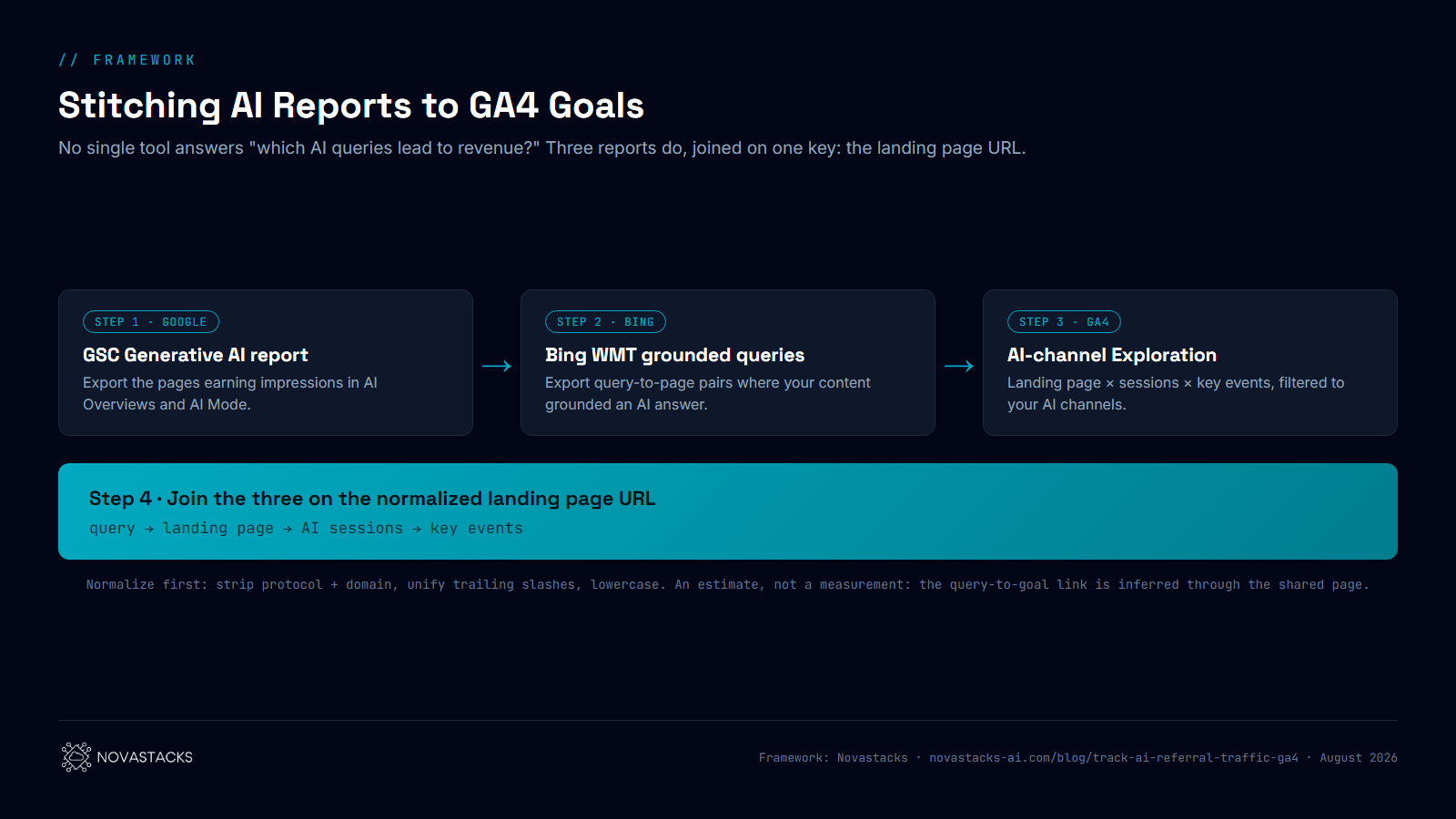
- Pull the pages Google's AI features surface. Search Console → Performance → the Generative AI report (rolling out since June 2026) lists the pages earning impressions inside AI Overviews and AI Mode. Export the page list. Note its limit: it shows pages and impressions, not queries.
- Pull the grounded queries from Bing Webmaster Tools. Bing's AI performance reporting shows the queries where your content grounded an AI answer, with the URL that was used. This is the query-level half Google doesn't give you yet, and because ChatGPT search grounds on Bing's index, it doubles as your ChatGPT proxy. Export query-to-page pairs.
- Pull AI-session outcomes from GA4. Build a free-form Exploration: Landing page as the row dimension, Sessions and your key events as metrics, filtered to the AI Assistant channel plus your custom AI channel. Now you have, per landing page, how many AI-referred visitors arrived and how many did the thing you care about.
- Join the three on landing page URL. A page that appears in the GSC generative report, carries grounded queries in Bing, and shows key events from AI sessions in GA4 is a proven AI-to-goal path. The Bing queries attached to that page are your best available estimate of which questions start those converting journeys.
The output worth putting in a deck is a short table: query → landing page → AI sessions → key events. Read it as an estimate, not a measurement: the query-to-conversion link is inferred through the shared page, and the zero-click influence around it stays invisible for all the reasons above. But it moves the conversation from "AI sends us 214 sessions" to "buyers asking these eight questions reach us through AI and convert", which is the version a budget decision can be made on.
One practical warning: normalize the URLs before joining. GSC reports full URLs, Bing may mix hosts and trailing slashes, and GA4's landing page dimension drops the domain. Strip protocol and domain, unify trailing slashes, and lowercase everything, or the join will silently drop your best pages.
- AEO & SEO Solutions: we build the tracking and the content that gets you cited in the first place, then operate both.
- Fractional Growth Partner: senior marketing leadership to turn AI-channel signal into a revenue story your board trusts.
FAQ
Does GA4 track ChatGPT traffic automatically now?
Yes, as of May 2026. GA4's native AI Assistant channel auto-labels clicks from ChatGPT (and Gemini, Deepseek, Copilot, and Grok) with no setup. It only catches visits that arrive with a matching referrer, so app traffic and zero-click answers still go uncounted.
Why does my AI traffic show up as Direct?
Traffic from native AI mobile apps and from privacy features like Safari's tracking prevention often arrives with no referrer. GA4 has nothing to match against, so it files the visit under Direct. Neither the native channel nor a custom regex can recover it, because the identifying information never reached your site.
What referrer domains should my regex include?
At minimum the core set (chatgpt.com, chat.openai.com, claude.ai, anthropic.com, gemini.google.com, copilot.microsoft.com, perplexity.ai, meta.ai, mistral.ai, deepseek.com, grok.com, x.ai) plus the second tier (poe.com, you.com, phind.com, quillbot.com, cohere.ai, huggingface.co, pi.ai, and more). The ~35-domain regex above covers both. Keep Perplexity and Meta AI in it specifically, since the native channel doesn't label them.
Why is my AI traffic so low?
Two reasons. First, the channel order: if your AI channel sits below Referral, Perplexity and other referral-based AI traffic gets claimed by Referral first. Move the AI channel above it. Second, and more fundamental, GA4 only counts clicks that carry a referrer. Most AI influence is zero-click or stripped to Direct, so a low number is expected, not a bug. Run the diagnostic above to size the gap.
Can I see AI Overviews or AI Mode traffic in GA4?
Not as AI traffic. Google's AI Overviews and AI Mode are counted as Organic Search, and the native AI Assistant channel explicitly excludes them. Use Search Console's Generative AI report (or the AI Overviews appearance filter) to see impressions from that surface, then compare against GA4 as shown in the diagnostic.
How do I estimate which AI queries lead to conversions?
Join three reports on the landing page URL: the pages surfacing in Search Console's Generative AI report, the grounded queries per page from Bing Webmaster Tools, and a GA4 Exploration of AI-channel sessions and key events by landing page. A page that appears in all three is a proven AI-to-goal path, and the Bing queries attached to it are your best estimate of which questions start those converting journeys. Treat it as an estimate: the query-to-conversion link is inferred through the shared page.
Sources
- Google Analytics Help, Default channel group ("AI Assistants" definition,
ai-assistantmedium). - Search Engine Land, "Google Analytics adds AI Assistant channel to measure AI traffic" (May 14, 2026).
- Search Engine Journal, "Google Analytics Adds AI Assistant As Default Channel Group."
- Search Engine Roundtable, "Google Analytics AI Assistant Traffic Tracks ChatGPT, Gemini, and Claude Traffic."
- Google Search Central Blog, "Introducing Search Generative AI performance reports in Search Console" (June 3, 2026).
Measure the AI demand that's actually moving your pipeline
Setting up the channel is step one. Knowing what it means for your revenue, and building the content that gets you cited in AI answers, is the work that compounds. That's what we operate for growth-stage teams.