Ecommerce SEO Best Practices: Help Search Engines Find the Inventory That Sells
Large catalogues usually struggle because crawlers cannot reach the right products, product pages compete with each other, and category pages say nothing a product page does not. Here is how to fix the structure first, then the pages.

Key Takeaways
- Most catalogue SEO problems are structural: products competing with each other, category and product pages that say the same thing, and important inventory buried too deep for crawlers to find.
- Fix crawl access first. Every product you want found needs a plain HTML link path from the homepage, and one canonical URL.
- Google's crawl budget guide is written for sites with 1 million or more pages, or 10,000 or more that change daily. Smaller stores usually have a discovery and priority problem.
- Category pages answer "show me options". Product pages answer "tell me about this item". Write titles, descriptions and copy for those two different jobs.
- On catalogues with millions of PDPs, decide which product pages deserve indexing, then reach them three ways: segmented XML sitemaps, IndexNow notifications and internal links from articles.
- Fast, stable pages matter: Google's Tokopedia case study reports a 35% increase in click through rate and an 8% increase in conversions after its performance work.
- Articles earn authority for the category: buying guides, comparisons and care content, each linking to the category page that owns the topic.
- Prepare for AI agents that shop for users: semantic HTML with ARIA labels, complete structured data and llms.txt.
An online store with ten products is easy for a search engine to understand. A store with ten thousand products, each in three colours and five sizes, sold under four categories and reachable through a dozen filters, is not. The pages multiply faster than anyone can review them.
The symptoms show up in Search Console before anyone names the cause. Products that sell well get no impressions. A filter URL ranks instead of the category page. Two near identical product pages take turns ranking for the same query and neither holds a position. The usual response is more keywords in more places, which changes nothing, because the problem sits in the structure of the site.
This guide sets out the SEO best practices for ecommerce we apply on large catalogues, in the order we work: first make sure crawlers reach the pages that matter, then control which product pages get indexed, then make each page type do its own job, and finally build the content and structure that support the whole catalogue in search and in AI assistants.
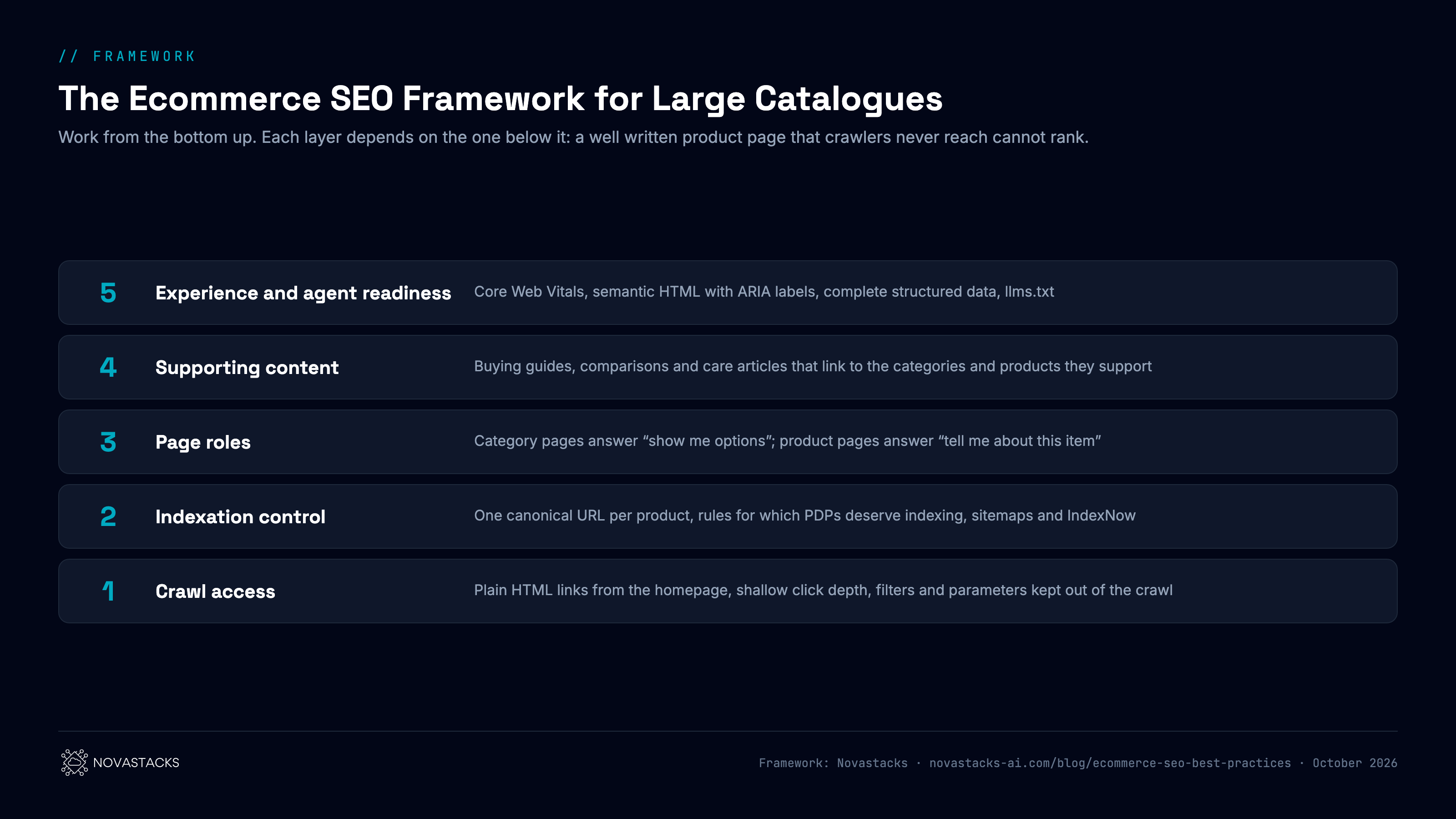
1. Why Large Catalogues Lose Search Visibility
Three problems come up again and again when we audit a large store. They are common because every one of them is the default outcome of a growing catalogue, unless someone designs against it.
| Problem | What you see in Search Console | Usual cause |
|---|---|---|
| Product pages compete with each other | Two or more URLs alternate on the same query; neither holds a position | Colour and size variants on separate URLs with the same copy; one product reachable through several category paths |
| Category and product pages look the same | A product page ranks for a broad category query, with a low click through rate | One title template for every page type; category pages that are only a product grid |
| Important inventory is hard to find | Many product URLs listed as "Discovered, currently not indexed" or "Crawled, currently not indexed" | Products linked only from deep pagination or from the sitemap; homepage links point at promotions instead of categories |
Each one dilutes something. Competing products split the signals a single page should collect. Identical page types leave Google guessing which page answers which kind of search. Buried inventory never gets a chance to compete at all.
2. Start With Crawl Accessibility
Before any page is optimised, confirm that crawlers can reach it. A product page that Googlebot never fetches cannot rank, however good its title is.
Three checks cover most of it:
- Links a crawler can follow. Google follows links written as an
<a>element with anhref. Menus, "load more" buttons and filters that only work through JavaScript click events may never be crawled, which Google's link best practices spell out. - Click depth. Count the clicks from the homepage to your best selling products. If the answer is five or more, those products depend on the sitemap to be discovered, and a sitemap entry is a weaker signal than a link from a page Google already values.
- Indexing reports. In Search Console's Pages report, look at which templates fill "Discovered, currently not indexed". If it is mostly product pages, the site is producing more URLs than Google considers worth crawling.
A note on crawl budget. Google's crawl budget guide says it is intended for large sites with 1 million or more unique pages that change about weekly, medium sites with 10,000 or more pages that change daily, and sites with a large share of URLs stuck in "Discovered, currently not indexed". Below those sizes, crawl budget is rarely the limit. The issue is usually that the store gives crawlers too many low value URLs and too few clear paths to the valuable ones.
3. Give Each Product a Single Indexable URL
Duplicate product URLs are the main source of cannibalisation in ecommerce. They appear without anyone deciding to create them:
- the same product reachable as
/shoes/runner-xand/sale/runner-x; - a separate URL for every colour or size, each with the same description;
- tracking and sort parameters appended to product links;
- uppercase, trailing slash and
httpversions that all resolve.
Pick one URL per product and make every signal agree with it. Google treats rel="canonical" as a strong hint, and its canonicalization documentation lists redirects, canonical tags and sitemap inclusion as signals it weighs together. When the canonical says one thing and the internal links, sitemap and hreflang point somewhere else, Google may choose its own canonical.
For variants, decide by search demand. If people search for the variant itself ("runner x black"), it can earn its own page with its own copy. If they do not, keep one product page with a variant selector and canonicalise the variant URLs to it.
4. Decide Which Product Pages Deserve to Be Indexed
On a catalogue with millions of product detail pages (PDPs), indexing every URL is rarely possible or useful. Google decides what it indexes, and a site that submits millions of thin or duplicate pages makes that decision harder for its best products. The work is to decide which PDPs deserve a place in the index, then give search engines consistent routes to exactly those pages.
| Check | Include the PDP when | Otherwise |
|---|---|---|
| Available | In stock, or out of stock with a return date | Discontinued for good: redirect to the closest replacement or the category, and remove from the sitemap |
| Unique | It has its own description, specifications and images | A near duplicate variant: canonicalise to the parent product |
| Wanted | The product name or its attributes are searched for, or it sells | No demand and no sales: keep it available to shoppers, leave it out of the sitemap |
| Clean | It returns a 200 status, carries a self referencing canonical and no noindex | Fix the technical state before submitting it |
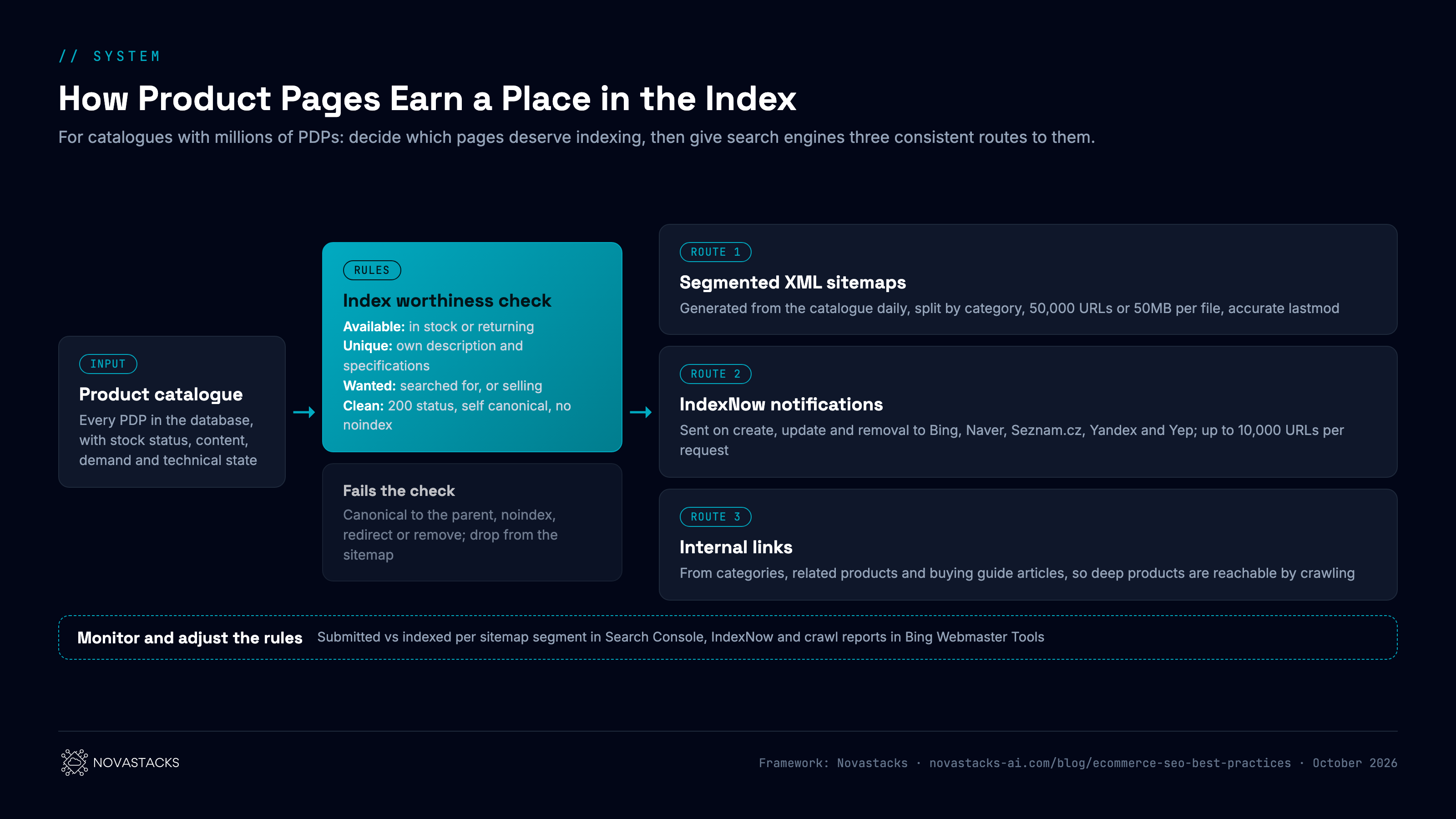
Generate sitemaps from the catalogue database
Build XML sitemaps from the product database every day, and include only the PDPs that pass the checks above. A crawl based sitemap repeats whatever mistakes the site already makes.
- Segment by category or brand. Google's sitemap guidelines limit each file to 50,000 URLs or 50MB uncompressed. Group the files in sitemap index files, one segment per category, so Search Console shows how many submitted pages are indexed in each part of the catalogue.
- Keep lastmod honest. Update it only when the page changes in a way that matters: price, stock, description. Google uses the lastmod value when it is consistently accurate, and ignores the priority and changefreq values.
- Remove what no longer qualifies. When a product is discontinued or fails a check, it leaves the sitemap in the next build.
Push changes with IndexNow
IndexNow lets a site tell search engines the moment a URL is added, updated or removed, instead of waiting to be recrawled. It is supported by Microsoft Bing, Naver, Seznam.cz, Yandex and Yep, and one request can carry up to 10,000 URLs. Connect it to catalogue events: a new product goes live, a price or stock status changes, a product is removed.
Google does not take part in IndexNow, so sitemaps and internal links remain the main routes for Google. Bing matters beyond its own results: ChatGPT search has used Bing results, so products Bing discovers quickly may reach ChatGPT answers sooner.
Let articles lead crawlers to deep products
A product on page 40 of a category listing is rarely reached through pagination. Buying guides and comparisons that link to specific products give those PDPs a path from pages that earn links and traffic of their own. Section 10 covers how to plan those articles.
5. Pagination and Filters
Category listings and filters are where catalogues produce the most URLs, so they need explicit rules.
Pagination
Google's pagination guidance is specific:
- give each page in the sequence its own URL, for example with
?page=2; - do not use the first page as the canonical for the whole sequence; each page gets its own canonical;
- link the pages to each other with normal links;
- do not put page numbers in URL fragments (the part after
#), because Google ignores them.
Google also states that it no longer uses rel="next" and rel="prev". They do no harm, but they do not replace crawlable links between pages.
Filters and faceted navigation
Every combination of colour, size, brand, price and sort order can create a URL. With enough filters, a catalogue of 5,000 products can expose millions of filter URLs, almost all of them near duplicates of the category page.
Sort them into two groups. Filter combinations with real search demand, such as "women's trail running shoes", deserve to be indexable landing pages with their own title, introduction and internal links. Everything else should be kept out of the crawl. Google's faceted navigation guide recommends two main options for filter URLs you do not need crawled: disallow the filter parameters in robots.txt, or move filters into URL fragments, which Google generally does not crawl.
6. Use robots.txt to Focus Crawling
robots.txt controls which URLs crawlers may request. On a catalogue site, its job is to stop crawlers spending time on URLs that will never deserve to rank.
Typical candidates to disallow:
- internal site search results;
- sort orders and view options (
?sort=,?view=); - filter parameters with no search demand;
- cart, checkout, account and wishlist paths;
- session and tracking parameters.
Two mistakes to avoid. First, robots.txt does not remove a page from Google. Google's robots.txt introduction states plainly that it is not a mechanism for keeping a page out of search; use noindex for that, and do not block the same URL in robots.txt, or Google never sees the noindex. Second, never block the CSS and JavaScript files the page needs to render, or Google sees a broken page.
Check AI crawlers too. The same file decides whether GPTBot, ClaudeBot, PerplexityBot and Google's own crawlers can read your product pages. Some CDN providers block AI crawlers by default. If you want your products named when shoppers ask an assistant, confirm those agents are allowed.
7. Internal Linking From the Homepage Down
Internal links tell crawlers which pages matter and how they relate. On most stores the homepage is the strongest page, and what it links to sets the priority for the rest of the site.
A structure that works for large catalogues:
- Homepage to top categories. Link every main category in plain HTML, in the navigation and in the body. Promotional banners change weekly; category links should not.
- Categories to subcategories. Each category page links down to its subcategories with the subcategory's own name as the anchor.
- Subcategories to products. The first page of each listing shows the products you most want found, ordered by your own priority. Sorting by date added pushes proven sellers down the list.
- Products back up and across. Breadcrumbs link each product to its category. Related product modules link to genuinely similar items.
Google's ecommerce site structure guide recommends the same idea: a logical hierarchy, linked from the homepage, with the most important pages closest to it.
8. Give Category and Product Pages Different Jobs
Once crawlers reach the right pages, make each page type answer its own kind of search. Category pages and product pages serve different moments, and their titles, descriptions and copy should show it.
| Category page | Product page | |
|---|---|---|
| Search it answers | "Show me options": women's running shoes, office chairs under $300 | "Tell me about this item": a model name, a product with a specific attribute |
| Title pattern | Category name + range or qualifier + brand | Product name + key attribute or variant + brand |
| Meta description | Range, price span, delivery or returns promise | The detail that decides the purchase: size, material, compatibility, stock |
| On page copy | A short introduction that helps choose, plus links to subcategories and guides | An original description, specifications, reviews, questions buyers ask |
| Structured data | BreadcrumbList | Product with Offer, plus AggregateRating where the reviews are genuine and shown on the page |
A category page that is only a grid of products gives Google nothing to tell it apart from the product pages it lists. Two or three paragraphs written for someone choosing between options, near the top, change that.
On product pages, the most common gap is copy. Manufacturer descriptions appear on every reseller's site. An original description built around what buyers ask, along with real reviews, gives the page a reason to rank above the same product elsewhere.
Structured data also helps AI assistants read product pages. In our own 500 query study of how each AI engine treats schema, on commercial queries 100% of the pages ChatGPT cited carried schema markup (67 pages), against 52% for Google AI Overviews. That describes the pages that were cited; adding schema alone has not been shown to earn a citation. Google's Product structured data documentation covers the properties that make product pages eligible for rich results.
Out of stock and discontinued products
Keep a temporarily out of stock product live, mark it as out of stock in the page and the Offer markup, and show alternatives. When a product is discontinued for good, redirect it to its closest replacement or its category, and remove it from the sitemap.
9. Core Web Vitals: Make Product Pages Fast and Stable
Core Web Vitals measure how a page feels to use: how fast the main content loads, how quickly the page responds, and whether the layout stays still. Google states that good Core Web Vitals, along with other page experience aspects, match the qualities that Google's core ranking systems seek to reward. They also decide whether a shopper stays long enough to buy.
| Metric | What it measures | Good | Common ecommerce cause of a poor score |
|---|---|---|---|
| Largest Contentful Paint (LCP) | Loading | 2.5 seconds or less | Large hero and product images, slow server response |
| Interaction to Next Paint (INP) | Responsiveness | 200 milliseconds or less | Heavy JavaScript, third party tags, chat and review widgets |
| Cumulative Layout Shift (CLS) | Visual stability | 0.1 or less | Images without set dimensions, promo bars and banners that load late |
Thresholds from web.dev, measured at the 75th percentile of page loads on mobile and desktop. Store pages are prone to all three problems, because they carry the most images, scripts and third party tools of any page type.
What this looked like at Tokopedia
My Core Web Vitals work at Tokopedia, one of the largest ecommerce companies in Indonesia, became a Google case study. At the time Tokopedia had more than 18 million product listings and over 50 million monthly visitors. The Tokopedia web performance case study on web.dev reports a 35% increase in click through rate, an 8% increase in conversions and a 4 second improvement in Time to Interactive. The approach it describes:
- a script controller that loads third party scripts selectively, to protect the critical rendering path;
- lighter libraries in place of heavy ones, and code splitting focused on above the fold content;
- adaptive loading, with lower quality images on slow networks, and lazy loading below the fold;
- a lite homepage for first time visitors, with the full assets cached in the background;
- a performance budget enforced in continuous integration, where a build fails if the bundle grows past its budget.
Few teams put the last point into their release process. Performance fixed once degrades with every new tag and widget. A budget that blocks a release keeps it fixed.
10. Support Categories With Articles
Category pages target competitive, commercial searches. To rank for them, a store needs to show it understands the topic, and product grids cannot do that alone. Articles can.
The articles that work for ecommerce answer the questions shoppers ask before they buy:
- Buying guides: how to choose a running shoe for flat feet;
- Comparisons: model A against model B, or material against material;
- How to and care content: how to clean suede, how to size a bike frame.
Each article has one job: answer its question fully, then link to the category or product page that owns the topic, with that page's subject as the anchor text. Ten guides that each link to the running shoe category tell search engines what that category is about far more clearly than a longer category description.
This content also reaches people earlier, before they have a product in mind. That matters more now that AI assistants answer many of those early questions directly and cite the pages they draw from.
11. Prepare Your Store for AI Agents
AI assistants are moving from answering questions about products to acting on them: opening a store, comparing options and moving toward checkout for the user. As that becomes common, stores that an agent can read and operate reliably should be easier for agents to use. Three foundations prepare a catalogue for it.
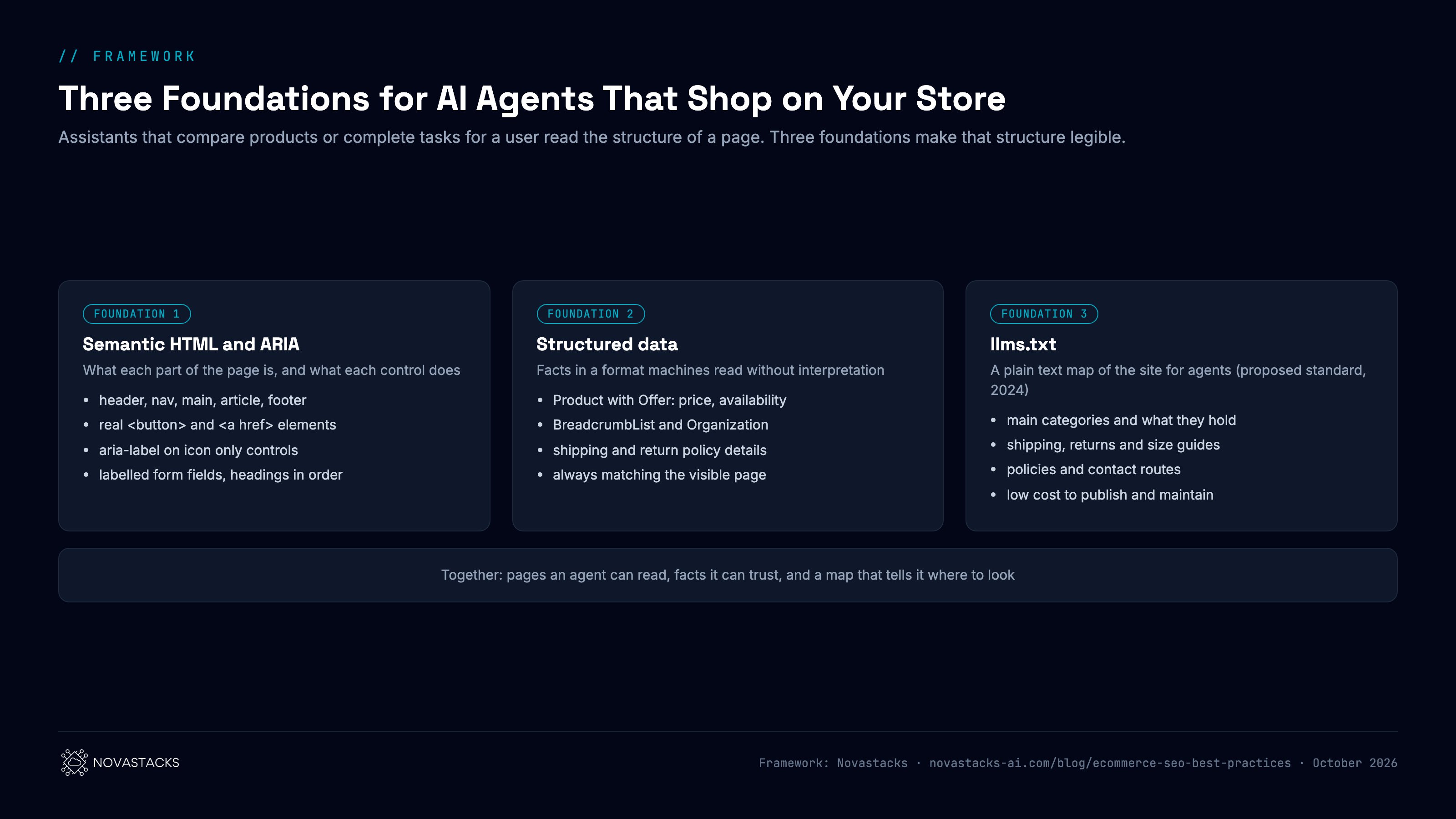
Semantic HTML and ARIA labels
An agent works from the structure of the page: which part is navigation, which is the product, which control adds an item to the cart. Use the HTML element that matches each job: header, nav, main, article and footer for page regions, button for actions, a href for navigation, label for form fields, and headings in order. Where a control has no visible text, such as an icon only cart or quantity button, give it an aria-label that names the action. MDN's ARIA guide states the first rule: when a native HTML element already has the meaning and behaviour you need, use it instead of adding ARIA to a generic element.
Complete structured data
Structured data hands agents the facts they need in a form they do not have to interpret: Product with Offer for price, currency and availability on every PDP, BreadcrumbList on product and category pages, Organization across the site, and merchant shipping and return policy markup where it applies. The markup has to match what the page shows. An agent that finds a different price in the markup and on the page has a reason to distrust both.
llms.txt
llms.txt is a proposed standard, first published by Jeremy Howard in 2024, for a plain text file at the root of a site that tells agents what the site contains and where its important pages are. For a store, that means the main categories, shipping and returns, size guides, policies and contact routes. It is cheap to publish and maintain. Treat it as a map for agents, and expect no ranking effect from it.
12. SEO Tips for Ecommerce: A Checklist
Use these SEO tips for ecommerce as a quarterly review:
- every main category is linked from the homepage in plain HTML;
- best selling products sit within three or four clicks of the homepage;
- each product has one canonical URL, and links, sitemap and canonical agree;
- PDPs are checked against the index worthiness rules before they enter the sitemap;
- sitemaps are generated daily from the catalogue, segmented by category, with honest lastmod;
- IndexNow fires on new, changed and removed products;
- paginated pages have their own URLs and canonicals;
- filter and sort URLs without search demand are kept out of the crawl;
- category pages carry an introduction; product pages carry original copy;
- titles and descriptions follow separate patterns for categories and products;
- Core Web Vitals pass at the 75th percentile, with a performance budget in the release process;
- buttons, links and form fields use semantic HTML, with aria labels on icon only controls;
- Product, Offer and BreadcrumbList markup matches the visible page;
- robots.txt allows the AI crawlers you want, and llms.txt maps the important sections.
13. How Novastacks Helps Ecommerce Teams
At Novastacks, ecommerce work follows the same four layer method we run for every client, with the examples adapted to a catalogue:
- What goes in: your product catalogue, customer reviews, Search Console data and what buyers search.
- What determines your AEO strategy and tactics: which categories, filters and products deserve their own pages, and which buyer questions to track in AI answers.
- What gets built: crawl and canonical fixes, product and breadcrumb schema, category copy, title standards and supporting articles.
- What you get: more of your catalogue found in search and named by AI assistants, measured page by page.
The full system is described in The Novastacks Methodology.
What this looked like for a game top up marketplace
One of Indonesia's largest game top up marketplaces, also serving the Philippines and Malaysia, had hundreds of product pages across three markets and no single record of them. A top up marketplace has the same structure as any online store: a catalogue of product pages, grouped by category, competing for buyers who search by product name. Titles named the product but rarely the in game currency buyers type into Google, and carried no consistent brand and country ending.
We built one maintained record of 459 product pages across the three markets, with each page's title, status and target keyword, and documented the canonical, indexing and template issues for the client's team. We then set one title standard for the Philippine and Malaysian product pages and grew an editorial programme around the questions players ask before they buy.
| Result | Before | After | Period |
|---|---|---|---|
| Non branded clicks, Indonesia | 100 | 253 | May to August 2026 (May = 100) |
| Non branded clicks, Philippines, before the title standard went live | 100 | 294 | May to August 2026 (May = 100) |
| Click through rate, retitled Philippine product pages | 1.41% | 3.07% | 17 days before and after the change |
| Articles we published in Indonesia that appeared in Google AI Overviews | 108 of 121 | May to September 2026 | |
The full story, including how each change was tracked to the exact pages and dates, is in the game top up marketplace case study. If you run a catalogue and want the same review of your own store, see our ecommerce SEO services, or how we approach AEO for ecommerce when the goal is getting products recommended by AI assistants.
Frequently Asked Questions
What are the most important ecommerce SEO best practices?
Make sure crawlers can reach every product you want found through plain HTML links from the homepage, give each product one canonical URL, control which filter and sort URLs can be crawled, and give category and product pages different titles, descriptions and copy. Then support your main categories with buying guides and comparisons that link to them.
How do I stop product pages from cannibalising each other?
Choose one URL per product and make the canonical tag, internal links and sitemap all point to it. Give colour or size variants their own page only when people search for the variant itself; otherwise keep one product page with a variant selector and canonicalise the variant URLs to it.
Should paginated category pages canonicalise to page one?
No. Google's pagination guidance says to give each page in the sequence its own URL and its own canonical, and to link the pages with normal crawlable links. Google no longer uses rel next and rel prev.
Does crawl budget matter for my online store?
Google's crawl budget guide is aimed at sites with 1 million or more unique pages, or 10,000 or more pages that change daily. Smaller stores rarely hit a crawl budget limit; their problem is usually too many low value filter and parameter URLs and too few links to the important products.
How do you get millions of product pages indexed?
Decide which product pages deserve indexing first: available, unique, wanted and technically clean. Then reach those pages three ways: XML sitemaps generated daily from the catalogue and segmented by category, IndexNow notifications when products are added, changed or removed, and internal links from categories and buying guides. Monitor submitted against indexed pages per sitemap segment in Search Console.
Does Google support IndexNow?
No. IndexNow is supported by Microsoft Bing, Naver, Seznam.cz, Yandex and Yep. For Google, keep accurate XML sitemaps and strong internal links. IndexNow can still help beyond Bing's own results, because ChatGPT search has used Bing results.
Do Core Web Vitals matter for ecommerce SEO?
Yes. Google states that good Core Web Vitals match the qualities that Google's core ranking systems seek to reward, and Google's Tokopedia case study reports a 35% increase in click through rate and an 8% increase in conversions after its performance work.
Can robots.txt remove filter pages from Google?
No. robots.txt stops crawling, but Google says it is not a mechanism for keeping a page out of search. Use noindex for pages already indexed, and do not block those same URLs in robots.txt, or Google cannot see the noindex.
Sources
- Google Search Central: Pagination best practices for Google
- Google Crawling Infrastructure: Managing crawling of faceted navigation URLs
- Google Crawling Infrastructure: Crawl budget management
- Google Search Central: How to specify a canonical with rel="canonical" and other methods
- Google Search Central: Robots.txt introduction and guide
- Google Search Central: Ecommerce website navigation structure
- Google Search Central: SEO link best practices
- Google Search Central: Intro to Product structured data
- Google Search Central: Build and submit a sitemap
- Google Search Central: Manage your sitemaps with sitemap index files
- IndexNow.org
- web.dev: Web Vitals
- web.dev: Tokopedia web performance case study
- MDN: ARIA
- llmstxt.org: The /llms.txt file
- Novastacks: Every AI Engine Plays by a Different Rulebook (500 query study)
- Novastacks: Game top up marketplace case study
Find out which of your products search engines cannot reach
We audit how crawlers move through your catalogue, which product and category pages compete, and which pages AI assistants already quote.