How to Make a Bot-Friendly Website for AEO and GEO
Over half of web traffic is now bots. How to make a bot-friendly website for AEO and GEO: crawler access, server side rendering, and who you let train on you.

Key Takeaways
- Two jobs, not one: being bot-friendly means making your site readable to the AI that cites you and deciding deliberately who may train on it.
- The JavaScript trap: most non-Google AI crawlers never run your browser code, so JS-assembled content can reach them as an empty page.
- Training is a business call: allow, block, or charge, marketing content usually benefits from letting training crawlers in; publishers should gate or charge.
- Two silent blockers: robots.txt templates that disallow AI crawlers by default, and CDN rules that challenge good bots. Check your server logs before assuming you're open.
- Crawls are not citations: a bot can fetch you thousands of times without ever recommending you, measure citations, not crawler visits.
- The site is ~15%: roughly 85% of what AI says about a brand comes from off-site sources, so a bot-friendly site is necessary, not sufficient.
Automated traffic passed half of all web traffic for the first time in a decade in 2024, at 51%, according to Imperva's Bad Bot Report. What those bots are there for has shifted since: Cloudflare's crawler data puts 52% of crawler requests on AI training as of June 2026, up from 22% in spring 2025. For most companies, the single most important visitor to their website is no longer a person. It is a crawler deciding whether to read you, remember you, and recommend you.
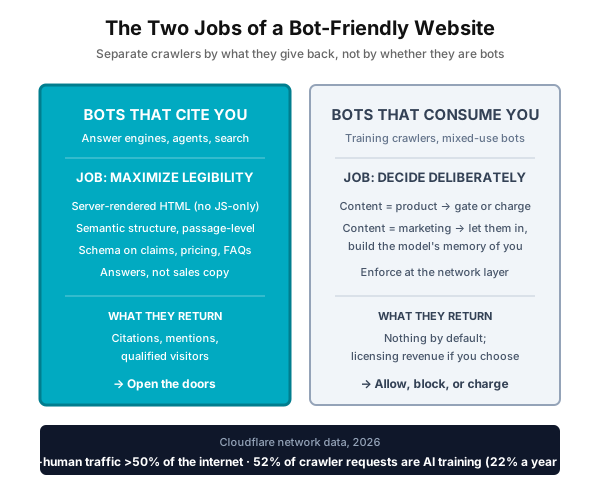
What is a bot-friendly website? A bot-friendly website is one that AI systems can read, understand, and cite, plus a deliberate choice about which AI companies may use your content to train their models.
That reframes what "bot-friendly" means. The phrase usually gets treated as a hospitality problem: open the doors and let the crawlers in. The reality has two halves. You want to be maximally readable to the AI systems that can cite you and send you qualified buyers. You also want to make a deliberate business decision about the ones that consume your content and return nothing. A website tuned for AI does both jobs at once.
Job one: be readable to the AI that can recommend you
Start with an uncomfortable question: can AI systems actually read your website? For a surprising number of companies the answer is no, and nobody in the building knows it.
The most common cause is invisible to a human visitor. Many modern websites only assemble their content after running code inside the visitor's browser, and most AI crawlers never run that code. Your prospect sees a polished page. The AI sees an empty one. Free scanners now exist that show you exactly what an AI receives when it fetches your page, so this is a question your web team can answer in an afternoon.
The second cause is self-inflicted. Plenty of companies block the very AI systems they want to be recommended by, through permission settings someone configured years ago and nobody has revisited. If your brand never shows up in AI answers, check whether you told the AI to go away.
Once AI can get in and read you, the work is making yourself easy to quote. AI systems lift passages, not pages, so content wins when each section answers one question on its own: clear headings, short self-contained explanations, plain tables where they fit. Practitioners who have run this as an experiment report the largest single gain coming from serving AI crawlers a simplified, cleanly structured version of each page.
One more thing has to be text. Anything that exists only inside an image or a video is not reliably available to an AI crawler: OpenAI's crawler documentation and Anthropic's ClaudeBot documentation describe fetching web pages, and neither documents reading text out of images or transcribing video. Pricing baked into a graphic, a spec sheet published as a screenshot, a founder explaining the method on video with no transcript: none of it can be quoted back to a buyer. If you want it cited, put it in text on the page.
Your facts need the same treatment as your prose. What you do, what it costs, who it serves: state these in the structured formats machines can verify, not just in marketing copy. The reason is a new step in the buying journey that most teams have not noticed. Before an AI assistant recommends a vendor, it checks whether that vendor actually meets the buyer's requirement. It can only check claims it can read. A site that states its facts plainly qualifies for the shortlist. A site that buries them in a brand video does not.
One rule ties it together: write your knowledge pages to answer questions, not to sell. AI systems are not looking for sales copy, they are looking for clear explanations. Keep the persuasion on your marketing pages, where humans decide, and make your explainers genuinely useful. Sitting underneath all of it is the ordinary machine-legibility layer: semantic HTML, clean URL structure, page speed, valid schema. The technical AEO foundations guide covers that layer rather than this one.
If you take one action from this section, put these five questions to your web team this week. Can AI crawlers read our pages without running browser code? Are we blocking any AI systems by accident? Is our key business information stated in structured, machine-readable form? Does each explainer section stand on its own? And which AI systems actually cite us today, versus merely visiting us?
Job two: be deliberate about who consumes you
Most guides stop at job one. Job two is the more interesting business decision. Being readable to AI is not the same as donating your content to it for free. The same Cloudflare report that counted the bots also documented the economics: AI crawlers increasingly take content to train models without sending any visitors back, and some of the most heavily crawled categories saw human traffic decline as much as 40% in less than a year. Google is still by far the largest single source of referral traffic to publishers, which is why they now plan for a "Google Zero" scenario where that stream thins out.
Slamming the doors is the wrong response. Separate the crawlers by what they give you instead. The systems that cite you, surface you in answers, and send qualified visitors deserve every ounce of readability you can offer. The ones that only ingest your content for training are a business decision: allow them, block them, or charge them. A market for that last option now exists. Dozens of publishers have signed content-licensing agreements with AI companies since 2023, tracked in Ithaka S+R's running list, and infrastructure providers now offer pay-per-crawl, metering access the way a utility meters power. The old system was a polite notice on your website that crawlers could ignore. The new controls are enforcement.
Enforcement only works if you can tell a real crawler from something wearing its name. A user-agent string is a claim, not an identity, and it is trivially copied. Cloudflare's verified-bot documentation sets out how the check is actually made: a cryptographic Web Bot Auth signature, a published IP range paired with a stable user-agent, or reverse DNS that resolves back to the operator's declared domain. Whoever runs your edge or CDN should be validating against one of those before an allow or a charge rule means anything.
Which choice is right depends on what your content is for. If content is your product, meaning you are a publisher, a data or research firm, or a course business, training crawlers are extracting your inventory, and gating or charging them is a real revenue decision. If content is your marketing, which describes most B2B companies, the calculus flips: being in a model's training data is how the model comes to know your brand at all, and what a model already knows before it retrieves anything is a major driver of whether it recommends you. For those companies, blocking training bots is self-harm dressed as protection. The genuine risks are narrower: if how-to blog traffic is your main acquisition channel, AI trained on your explainers will answer those questions directly and thin that funnel, and openly published proprietary frameworks can be absorbed and repeated to anyone. The response to both is the same: move the moat to what AI cannot replicate, not to the firewall.
Either way, make the choice consciously, at the infrastructure level, rather than discover months later that you made a decision by default.
The two common mistakes that block good bots
Everything above assumes you know who is getting in. In audits we keep finding the opposite: sites that believe they are open to AI and are quietly blocking it. Two mistakes account for almost all of it.
Mistake 1: robots.txt disallows AI crawlers by default
A surprising number of robots.txt files disallow AI crawlers not because anyone decided to, but because the file was copied from a template, generated by a plugin, or shipped by a platform with "block AI bots" toggled on. The decision from job two was made for you, in the most damaging direction, and nobody remembers making it. We have seen this on live commercial sites whose teams fully intended to be visible in AI answers.
The fix takes minutes: open your robots.txt today and read every User-agent block naming an AI crawler. Each one should be a decision you can defend, not an inherited default. And remember the asymmetry: blocking a search-and-citation bot like OAI-SearchBot or PerplexityBot removes you from AI answers entirely, which is a far bigger cost than whatever the template was protecting you from.
Mistake 2: your CDN or WAF is challenging the bots you meant to allow
robots.txt is only the polite layer. The enforcement layer, your CDN, WAF, or bot-management product, can override it silently: a JavaScript challenge, a managed "bot fight" rule, or a rate limit will turn away a crawler that robots.txt welcomed, and nothing on the page will tell you. AI crawlers cannot solve a JavaScript challenge for the same reason they cannot render your SPA: they do not execute scripts. To them, a challenge page is a dead end.
These are the AI-relevant good bots worth explicitly allowing, with the token to match in your logs and rules:
| User agent (token to match) | Platform | Purpose |
|---|---|---|
GPTBot | OpenAI | Training crawler; builds what ChatGPT knows about you |
OAI-SearchBot | OpenAI | ChatGPT search index; drives citations in answers |
ChatGPT-User | OpenAI | Real-time fetch when a user's chat needs your page |
ClaudeBot | Anthropic | Training and index crawl for Claude |
Claude-User | Anthropic | Real-time fetch triggered by a Claude user |
PerplexityBot | Perplexity | Search index; drives Perplexity citations |
Perplexity-User | Perplexity | Real-time fetch for a user's query |
Bingbot | Microsoft | Bing index, which also grounds Copilot and ChatGPT search |
Google-Extended | robots.txt control token for Gemini training (not a separate crawler; Googlebot does the fetching) | |
Applebot | Apple | Siri and Apple Intelligence; Applebot-Extended is the training control token |
Then verify against reality: filter your server logs for these tokens and look at the status codes you served them. Rows of 403, 429, or challenge responses mean your edge is turning away bots your robots.txt invited in. Major CDNs make the allow side straightforward, because Cloudflare, Akamai, Fastly and AWS all maintain verified-bot programs that authenticate a crawler cryptographically or by published IP range before your allow rule applies, using the same verification methods described above.
The failure mode is building your own allowlist. A hand-rolled rule that matches exact user-agent strings breaks the day a crawler version-bumps its string, and one that trusts the user-agent alone lets every impersonator through, which is exactly backwards. If you run your own filtering, match on the tokens above rather than full strings, verify by published IP range or reverse DNS, and re-test after every WAF rule change. Better: lean on your CDN's verified-bot category and spend the saved effort on content.
The mistake that shows up after you unblock good bots
Fix those two and you expect the citations to follow. Often they do not, and the logs are the confusing part: robots.txt allows every AI crawler, the CDN has stopped challenging them, and the status codes are a clean wall of 200s. The crawler is getting in. It is just not getting anything. This is the mistake that survives both of the fixes above, and it is the hardest of the three to spot, because nothing about it looks like a block.
The cause is how the page is built. A single page application, or any site that leans heavily on client side rendering, sends an almost empty HTML document: a container div and a bundle of JavaScript. The headline, the pricing, the FAQ answers, the comparison table you wrote to get quoted, all of it appears later, once the visitor's browser has downloaded, parsed and run that bundle. A person never notices, because their browser does that work in a few hundred milliseconds. A crawler that does not run the bundle receives exactly what was in the response, which is nothing worth citing.
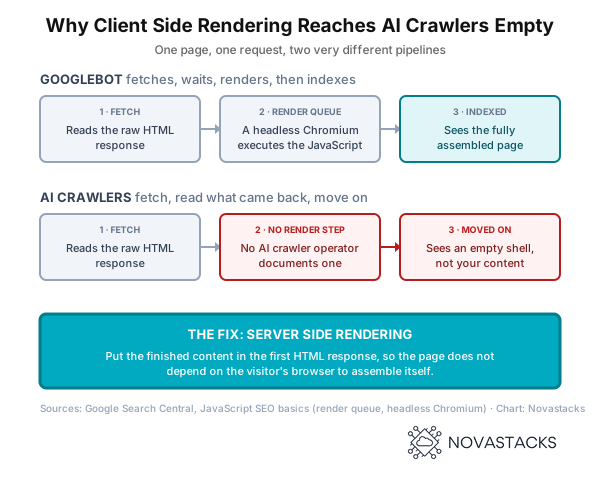
What makes this easy to miss is that Google copes with it. Google documents a render phase: pages returning a 200 are queued, and when resources free up a headless Chromium renders the page and executes the JavaScript before any of it reaches the index. So the application ranks, the SEO team reports that JavaScript is not a problem here, and everyone relaxes on evidence that came from the one crawler least representative of the group. Google's own guidance says the quiet part plainly: server side rendering still matters because not all bots can run JavaScript.
The difference is purpose, not sophistication. A search engine crawler exists to build a comprehensive library of the web, where completeness is the product, so parking a page in a render queue and returning to it hours later is a trade worth making. AI crawlers are not building that library. They are fetching to train a model, or to answer a question somebody is waiting on right now, and what governs them is efficiency and effectiveness: how much usable text per fetch, across how many sources, for how much compute. Running a full browser is the most expensive thing a crawler can do. When a fetch comes back with nothing usable, the cheap move is not to render it, it is to go read one of the other sources that answered on the first try. No AI crawler operator currently documents a rendering step, and that arithmetic is the reason to assume none is coming.
Checking this takes one command and no tooling. Request your own page the way a crawler does,
without a browser: curl -sL https://yourdomain.com/your-page, and read what comes
back. If your headline, body copy, pricing and FAQ answers are not in that response, they are not
there for the crawler either, however complete the page looks in Chrome. Our
free AEO checker runs the same fetch and scores what an AI
actually receives, if you would rather see it laid out than read raw HTML.
The fix is to move the rendering off the visitor's machine and onto yours. Server side rendering returns finished HTML on every request. Static generation builds that HTML once at deploy time and serves it as a file. Either one puts your content in the first response, which is the only response an AI crawler is guaranteed to read. Prerendering at the edge, where crawlers receive a rendered copy of the same page, is what most teams reach for first and it does work, but it adds a layer to maintain and Google now treats it as a workaround rather than a durable solution. Whichever route you take the rule is the same: serve a crawler the same content a person gets, already assembled.
Measure citations, not crawls
A trap sits between the two jobs. It is easy to see AI crawlers all over your traffic logs and assume you are winning. Crawls are not citations. An AI can visit your site thousands of times without ever mentioning you to a single buyer. Visits measure interest in your content as raw material. Citations measure whether the AI actually recommends you. Track both, and treat the gap between them as your real to-do list.
Two things that keep this honest
Your website is necessary but not sufficient. AirOps' analysis of AI brand mentions found 85% came from external domains and only 13.2% from the brand's own site: Reddit, YouTube, review platforms and third-party write-ups do most of the talking. A perfectly bot-friendly site is roughly a seventh of the picture. Fix the site because it is the part you fully control, then go do the off-site work.
None of this is a separate discipline with its own bag of tricks, either. Google's own guidance on AI search is that it is still search, done for people. Build for humans, make the result machine-readable, and skip the gimmicks that get punished later. The sites that win are readable by a person, parseable by a model, and clear about which models get in.
How Novastacks Applies This
AEO Services
Crawler legibility audits plus the off-site work behind 85% of AI mentions.
Our Methodology
How we build and operate these systems: Discover, Design, Build, Operate.
FAQ
Do AI crawlers like GPTBot and ClaudeBot execute JavaScript?
No. Most non-Google AI crawlers fetch raw HTML without running scripts. If your content only appears after JavaScript executes, those crawlers see an empty page. Server-side rendering or static HTML fixes this.
Should I block AI training crawlers?
It depends on what your content is for. If content is your product, such as publishing, data, or courses, gating or charging training crawlers is a real revenue decision. If content is your marketing, being in training data helps AI models know and recommend your brand, so blocking usually hurts you.
What is llms.txt and do I need it?
llms.txt is a file that points AI agents to your most important pages, like a table of contents. Adoption is narrow: Google's John Mueller has said no AI system currently uses it. It is low effort and low risk, but not a growth lever.
How do I check whether my CDN is blocking AI crawlers?
Filter your server logs for AI crawler tokens (GPTBot, OAI-SearchBot, ClaudeBot, PerplexityBot, Bingbot) and check the status codes you served them. Rows of 403, 429, or challenge responses mean your edge is turning them away even if robots.txt allows them. Major CDNs like Cloudflare and Akamai maintain verified-bot programs that authenticate legitimate crawlers; the common failure is a hand-built allowlist that matches exact user-agent strings or trusts the user-agent alone.
Does heavy bot traffic mean my AEO is working?
No. Crawls are not citations. A bot can fetch your site thousands of times without the model ever mentioning you. Measure actual citations in AI answers, not crawler activity in your logs.
How much of AI visibility does my website control?
A minority of it. AirOps' analysis of AI brand mentions found 85% came from external domains and 13.2% from the brand's own site, so off-site sources such as Reddit, YouTube, reviews and third-party write-ups do most of the talking. A bot-friendly site is necessary, not sufficient.
Sources
- Imperva (Thales), 2025 Bad Bot Report, automated traffic reached 51% of all web traffic in 2024, passing human traffic for the first time in a decade.
- Cloudflare, Content Independence Day, one year on (1 July 2026), 52% of crawler requests were for AI training as of June 2026, up from 22% in spring 2025; the most heavily crawled categories saw human traffic fall as much as 40% in under a year.
- Cloudflare, Verified bots, how a legitimate crawler is distinguished from an impersonated user-agent (Web Bot Auth, published IP ranges, reverse DNS).
- OpenAI, OpenAI crawlers, and Anthropic, ClaudeBot, published crawler behaviour; neither documents reading text out of images or transcribing video.
- Ithaka S+R, Generative AI Licensing Agreement Tracker, running record of publisher, AI licensing deals.
- AirOps (Oshen Davidson, 17 October 2025), The Influence of Offsite Signals in AI Search, 85% of brand mentions came from external domains, 13.2% from the brand’s own domain.
- John Mueller, Google Search Advocate, post on llms.txt (17 June 2025), “no AI system currently uses llms.txt”.
- Google Search Central, JavaScript SEO basics, the three phases (crawling, rendering, indexing), the render queue and the headless Chromium that executes JavaScript, plus the note that not all bots can run JavaScript; and Dynamic rendering, which Google describes as a workaround rather than a durable solution.
Get a Bot-Friendly Site Audit
Find out whether AI crawlers can read and cite your content. We'll assess your technical foundation and identify quick wins.