How to make your AI employees work for you, not the other way around (copy-paste prompt included)
I built a Control Panel to get a bird's-eye view of my AI employees' progress, and to interact and decide in one place. I delegate far more to them now, without trading that off against AI slop or lost oversight.
Key Takeaways
- What this article gives you: a complete build guide, copy-paste prompt included, for a Control Panel: one self-hosted page showing only the decisions your AI agents are waiting on, each with a button that finishes it.
- Who it is for: founders and small-team operators already running several AI agents or scheduled jobs, who have ended up chasing those agents instead of directing them.
- The problem it solves: AI scaled your production and left approval exactly where it was. Every agent you add is another place to check, and all that checking happens serially, in one head.
- Why it matters: switching between those places is the cost nobody budgets for. Attention residue means each check contaminates the next, and task-switching has been estimated to cost up to 40 percent of productive time.
- What you actually build: self-running agents on their own cadence that draft but never send, a verification step that drops anything it cannot confirm, and one page you clear in ten minutes from your phone.
- What it costs: nothing new. These are local agents running on the subscription you already pay for, not cloud agents billing per token through an API, so they can fire daily without a meter running. Add Tailscale's free tier and a computer you already own. No database, no hosting bill, no second subscription.
Should you build a Control Panel? If two or three of these are true, yes
One rule: two or more yeses and it is worth your weekend.
Tick the ones that are true. 0 of 8 so far.
What a Control Panel actually is, and what happens when you open it
It is one web page, served from your own machine and password protected. You can open it on mobile or desktop, anywhere, on the go.
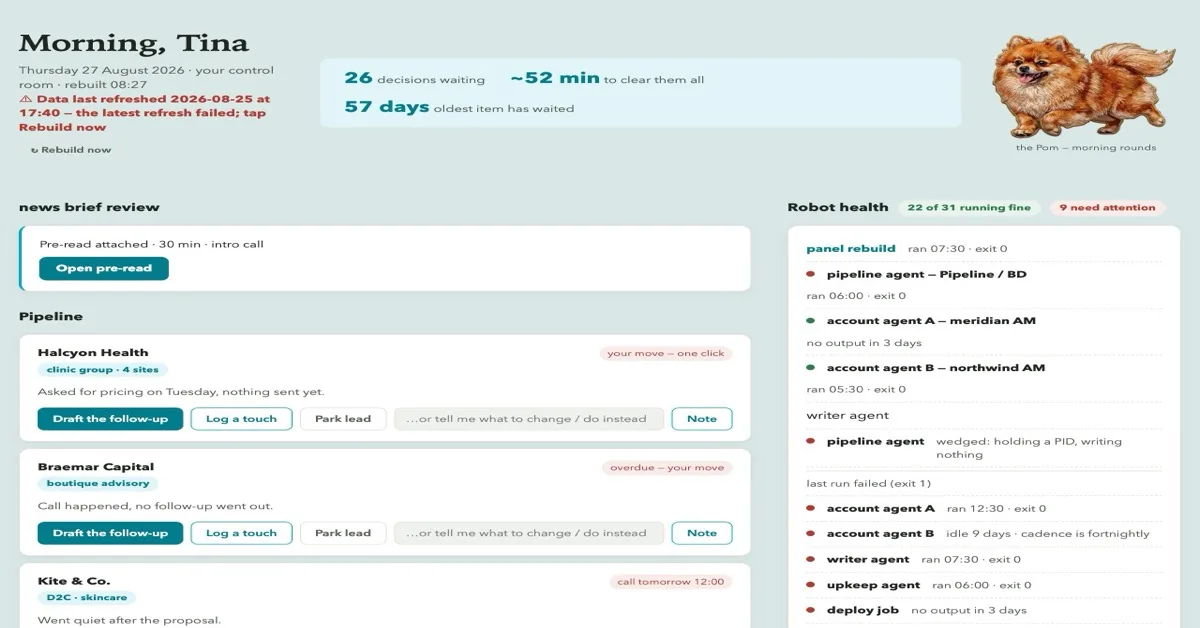
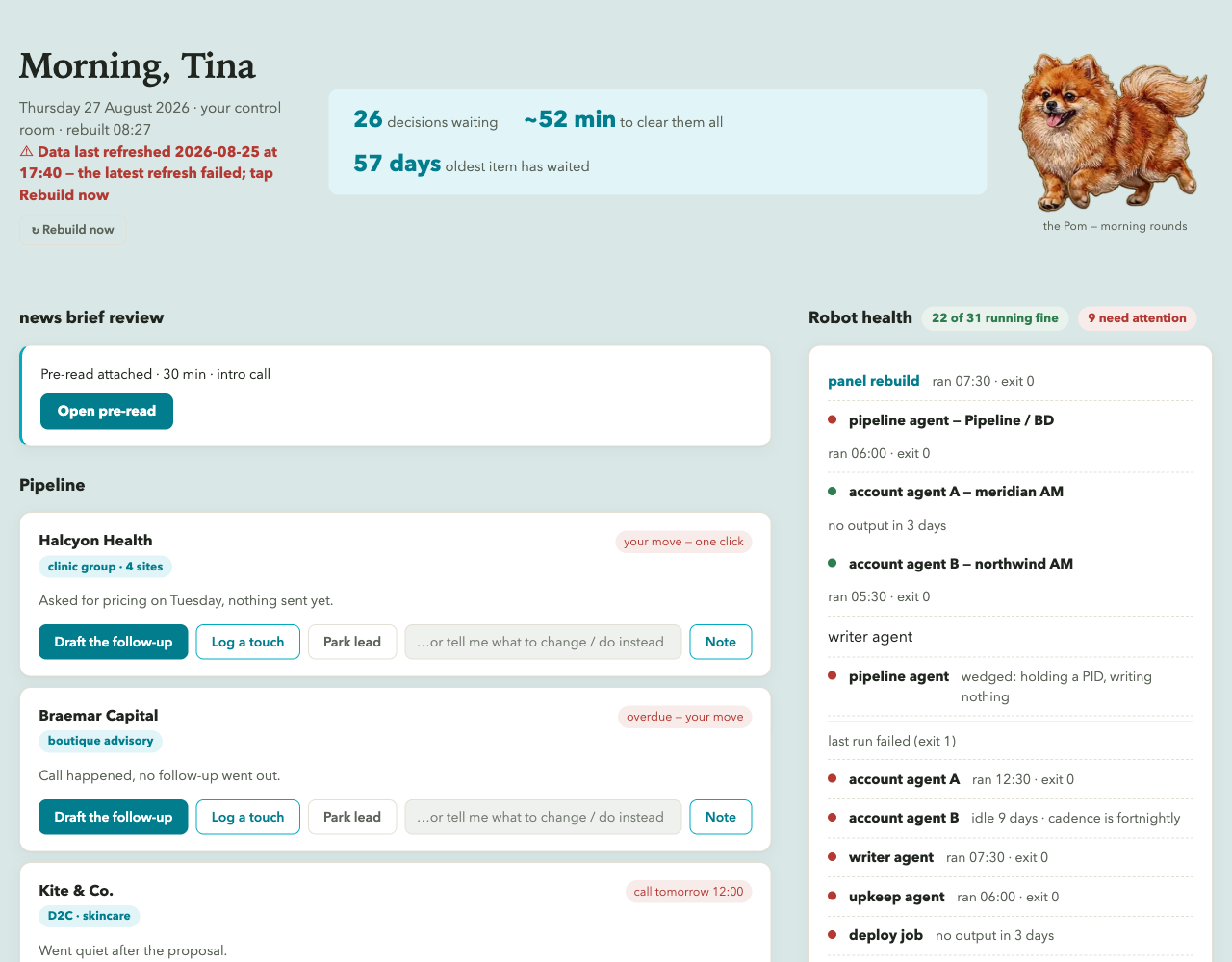
On it is a short list of the decisions currently waiting on you. Each one is a card: who or what it concerns, one line of status, the single next move, and a button that completes it. Below that, a strip showing whether each of your agents actually ran. At the bottom, a text box.
A morning looks like this. You open it on your phone over coffee. Eight items. Three are drafted emails, and tapping Send on each one sends it, with no second screen and no "open this in Gmail". Two are leads that have gone quiet, so you park one and log a touch on the other. One is a job that died on Tuesday, which you now know about. You type "chase the Thursday quote and prep tomorrow's meeting" into the box, and close the page. Six minutes.
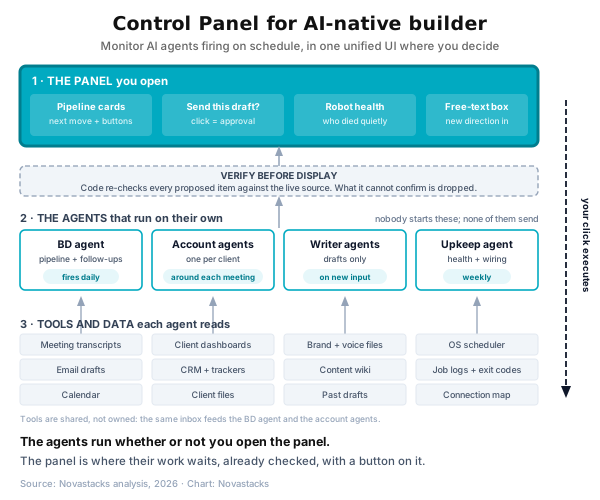
Everything that produced that page happened while you were asleep:
- Your agents woke on their own schedules and wrote what they found to files.
- A build step read those files and picked out only the items that need a human.
- A verification step re-checked each one against the live source and dropped anything it could not confirm.
- Deterministic code rendered whatever survived into the page.
The cheat sheet: build the Control Panel yourself
This is the prompt I would hand a founder. Paste it into Claude Code, Codex, or whatever coding agent you already pay for. It is written to make the agent interview you first, because the sources it needs to read are specific to you.
The rest of this article explains what each part of that prompt is defending against, so you can adapt it instead of running it blind.
Your AI employees are working. You are still the bottleneck
Adding AI to a small company solves the production problem quickly, but creates a supervision problem slowly.
Mine looked like this. An agent researches a prospect and writes the follow-up email. It sits in Drafts. A monitoring job checks whether a client's pages are still cited by AI engines. It writes a file. A writing agent produces a draft. It lands in a folder. Every one of those is finished work, and every one of them is finished work that has not happened yet, because the last step belongs to me. And that last step goes onto a mental backlog I never catch up with, and it compounds.
Three specific costs:
You re-draft what has already been drafted. The agent wrote a perfectly good follow-up. You never opened the folder, so on Thursday you write the email yourself from scratch. You have now paid for the work twice.
You reconstruct context that already exists in writing. Before replying to a lead you go and remember: what did we send, when, what did they say, what were we waiting on? The transcript, the tracker, and the last thread all contain the answer. Reassembling it in your head is a tax you pay per conversation, several times a week.
You audit your AI staff by hand. This is the one people underestimate. A human employee who stops doing their job tells you, or someone notices. An agent that stops doing its job produces silence, and silence looks exactly like everything being fine.
The hidden cost of cognitive overload that never reaches your P&L
You are halfway through a client email when Slack pulls you away. You answer it, check whether last night's job actually ran, take a call, then come back forty minutes later and have to read your own half-written email from the top before you can finish the sentence. Call it context switching, or just too many tabs open. The research name is attention residue: Sophie Leroy, who studies organisational behaviour at the University of Washington, found in 2009 that part of your mind stays behind on the task you left, worst of all when you left it unfinished. David Meyer, whose task-switching experiments underpin much of this research, estimates the resulting mental blocks can cost up to 40 percent of productive time. Even a third of that dwarfs what you spend on software.
For anyone running a company on AI, the problem grows with the number of agents. Every one you add is another place to check. A folder here, a log there, drafts somewhere else. Each is a real gain on its own; together they hand you more output and ten more places to look. A Control Panel collapses the ten into one, and the places were the expensive part.
The Control Panel is the smaller half: self-running local agents are the real system
If you build only the Control Panel, you have built a nicer to-do list, and you will stop opening it inside a fortnight. What makes it work is underneath: agents that run on their own schedule and update the state the panel reads. Nobody starts them. The BD agent fires daily and reconciles the pipeline; the account agents wake around each client meeting. By the time you open the page, the work is done and waiting.
An agent you have to invoke is a tool, and a tool still needs you to remember it exists. An agent that fires on its own is staff. Four properties make the difference:
- A standing goal, not a task. "Keep the pipeline list true and the next move current" survives contact with reality. "Draft three follow-ups" expires on Tuesday.
- An explicit list of what it owns. Two agents writing to one file corrupt each other quietly, and you find out late.
- A cadence. Daily, weekly, on-trigger, around a calendar event. Skip this and it goes back to being a tool you have to remember.
- Draft-first, always. It prepares, it never sends. Its output becomes a card with a button, which is what makes running it unattended safe.
These are local agents, and the difference from cloud agents is economic. A local agent is a command-line tool on your own machine, Claude Code or OpenAI's Codex CLI, running on the flat-rate plan you already pay for. A cloud agent such as Anthropic's Managed Agents, currently in beta, meters every run. Same model, different bill. On a flat rate you let an agent check something hourly without thinking; per token, that becomes a line item founders start rationing.
The four rules that make a Control Panel trustworthy
Split judgment from rendering. Two phases with a hard boundary between them. An AI call reads your actual sources and writes a plain JSON file of candidate decisions. Then deterministic code takes that JSON and fills a fixed, pre-approved template. Let a model near your layout and it will redesign the page every morning, helpfully, forever. The renderer should fail loudly if it cannot find its anchor points, so a subtly-wrong page never gets served.
Verify before display. This is the rule the entire system rests on. Everything the AI proposes gets independently re-checked by ordinary code against the live source at build time. The draft ID must still be in Drafts. The lead must still have dated evidence of being alive. Anything that cannot be confirmed is dropped rather than guessed. The reasoning is behavioural, not technical: you will forgive a page that is missing an item, and you will abandon a page that invents one. An untrusted panel is worse than no panel, because you now have a daily ritual that produces nothing.
The click is the approval. Buttons post to a small local server that executes a short, explicit list of actions and returns a real confirmation. Sending the drafted email is the approval, and there is no second confirmation screen, because a second screen is just the bottleneck again in a nicer font. Keep the action list short enough to hold in your head, append every action to an audit log, and make anything destructive re-check its target before it fires.
Free text is an input, not a note. One text box. What you type is queued to a file, and a small supervisor process drains that queue by handing items to a headless AI call, one at a time, with a lock, a timeout, and a cap per run. Results come back as files. This is what makes the panel two-way: it tells you what needs deciding, and it takes new direction without you opening a terminal. Typing "chase the Thursday quote and prep tomorrow's meeting" into a phone at a school pickup is the whole feature.
Human in the loop and human on the loop: you need both
Most advice on this collapses into one instruction: keep a human in the loop. That is half a design.
Human in the loop means the system stops and waits for a person before it acts. Nothing goes out until someone approves it. Human on the loop means the system runs on its own and the person supervises, stepping in when something looks wrong.
Trying to be in the loop on everything is what produces the bottleneck this article opens with. You become a queue of one, and the agents' throughput is capped by your attention. Being on the loop for everything is how you discover in week three that an agent died in week one.
A Control Panel does both, and the split is decided by reversibility:
- In the loop for anything that touches money, a client relationship, or the outside world: sending an email, publishing a page, moving a deal stage. These become cards with buttons. Nothing sends itself.
- On the loop for everything internal and reversible, such as research, drafting, monitoring, file writes. These run unattended and report by exception. Your supervision is the health strip, not a card per run.
Writing the split down is most of the work. Once every agent knows which side of the line each of its actions falls on, "draft-first, never send" stops being a hope you have about your agents and becomes a property of the system.
The stack is boring on purpose, and one model can build all of it
I did not want to learn about vector databases or pay for another LLM subscription. I wanted to build on top of what I already had. Fable, the Claude model I work in, worked the whole stack out in half an afternoon:
- One file running a standard-library HTTP server. No framework, no build step. It serves the page and accepts button clicks.
- Flat files for state. JSON for what is true now, append-only logs for what happened. No database, no migrations.
- Your computer's own scheduler. launchd on a Mac, cron elsewhere. Three jobs: the server, the rebuild, the queue drainer.
- Headless calls to one coding agent, used only for the judgment step.
Almost nothing new to install, which is why this is buildable by a founder who does not write code. Flat files are also what let the agents and the page share one source of truth: agents write files, the panel reads them, your clicks append to the same logs the agents read on their next run. Nothing to integrate.
Reach it from your phone, or you will not use it. I ran the first version on localhost and checked it twice a week, because I was only ever at my desk when I was already working. Put it on Tailscale: same account on machine and phone, bind the server to 0.0.0.0, reach it at the tailnet IP. No port forwarding, no domain, no cloud host. Add a short PIN so a borrowed phone sees a lock screen instead of your pipeline. Then design for a 390px screen, and never truncate text on the server.
What it costs to run: nothing you are not already paying.
- Coding agent: $0 incremental. These run as local agents on the subscription you already pay for, not as cloud agents on the metered API. Strip API billing keys out of the environment your scheduled jobs inherit, or the same command silently switches to per-token billing and your "free" panel starts charging you.
- Tailscale: $0. The Personal plan is free indefinitely, up to six users and unlimited devices.
- Hosting: $0. It runs on a computer you already own.
- Database, domain, TLS certificate, cloud account: none of the above.
The one real requirement is a machine that stays on. A laptop that travels and sleeps will not do it: the agents stop firing the moment you shut the lid. I run mine on a Mac mini that sits on a shelf and never sleeps, which is the whole hardware budget.
What a Control Panel will not do for you
- It will not fix agents that produce bad work. You will just see them being wrong every morning, on schedule.
- It does not remove judgment. Every item is there because it needs a person. You spend judgment on the decision, not on finding it.
- It needs gardening for the first month. Anything that turns out not to need you gets automated away or suppressed, or the page becomes a backlog.
- It is single-operator by design. Two people clearing one queue needs shared state, locking and a named audit trail. Different, much larger build.
- Preference toggles are not enforcement. Mine record an intention and nothing more, and the page says so under each toggle.
Frequently asked questions
Is this just a dashboard?
Do I need to be able to code?
Which model should build it?
What about security if it is on my phone?
How is this different from running Claude Code on my phone?
What is the difference between human in the loop and human on the loop?
How many items should be on the page?
Sources
- University of Washington — Sophie Leroy, "Why is it so hard to do my work? The challenge of attention residue" (Organizational Behavior and Human Decision Processes, 2009). Origin of the term attention residue.
- American Psychological Association — Rubinstein, Meyer & Evans, "Executive Control of Cognitive Processes in Task Switching" (Journal of Experimental Psychology: Human Perception and Performance, 27(4), 2001).
- American Psychological Association — "Multitasking: Switching costs." Source of David Meyer's estimate that switching can cost up to 40 percent of productive time.
- DEV Community — "AI Agent Silent Failures: What 6 Hours of Undetected Downtime Taught Me About Monitoring."
- Tailscale — official documentation.
- Tailscale pricing — the Personal plan is free indefinitely, up to six users and unlimited devices. Verified 27 August 2026.
- Anthropic — Managed Agents (beta): server-managed agents with scheduled deployments, billed per token through the API.
Want this wired into your marketing operation?
We design and run the agent systems behind it, then hand you the panel.